How to Use the Eco 10in1 160K: Complete Step‑by‑Step User Guide
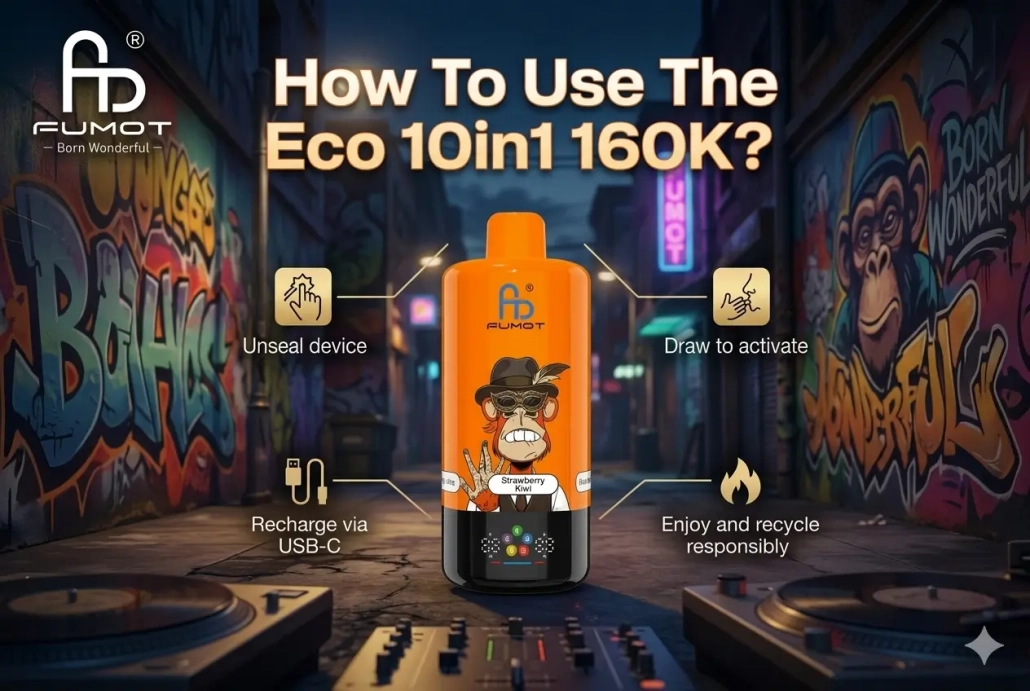
If you have just got your hands on the Eco 10in1 160K multi‑flavour disposable device, you may wonder how to get the best vaping experience from its unique 10‑in‑1 flavour system. This practical guide follows the official step sequence, quotes original on‑graphic text, and adds extra explanations to help you master every operation, from unboxing to switching between single and blended flavour profiles, plus how to read the smart display screen correctly.
Step 1
Remove the device from the candy bag. Remove silicone plug and sticker to vape.
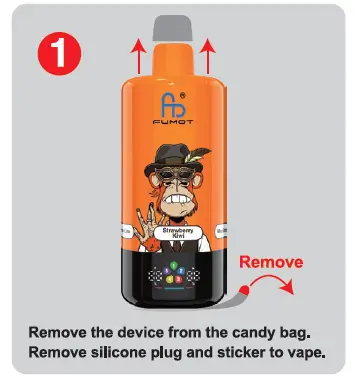
This is your very first action after unboxing your Eco 10in1 160K. Take the unit out of its original candy‑style packaging. Next, peel off the protective sticker and pull out the silicone plug on top of the mouthpiece. These protective parts are installed for shipping protection. If you skip this step, airflow will be blocked, which can lead to weak draws or no vapour output. Remove both items fully before you take your first puff.
Step 2
Pull up the drip tip , then twist it to switch flavors.The current battery level is shown on the left of the screen, while the remaining e‑liquid volume for the active flavor is displayed on the right. This applies to all flavors.
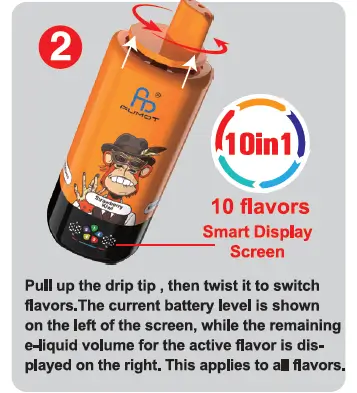
After finishing step 1, you can start changing flavours. Lift the drip tip upwards, and rotate it to cycle through available flavour selections. The built‑in smart display gives real‑time device metrics. The left section always shows your remaining battery power. The right‑hand reading reflects leftover e‑liquid for whichever flavour you have selected at that moment. This screen display function works consistently for every one of the 10 built‑in flavours, for both pure single flavours and mixed blended flavours. Checking these values regularly lets you keep track of battery life and e‑liquid consumption.
Step 3
This device comes with 10 flavors in total. Flavors 1 to 5 are single flavors, while Flavors 6 to 10 are blended flavors.The digit 1 flashes when using the first flavor, likewise for all other single flavors.Pull up the drip tip to switch to blended flavors. Flavor 6 is a combination of 1 and 2, Flavor 7 combines 2 and 3, Flavor 8 combines 3 and 4, Flavor 9 combines 4 and 5, and Flavor 10 combines 5 and 1.When vaping a blended flavor such as Flavor 6, both Screen 1 and Screen 2 will flash. This rule applies to all other blended flavors.
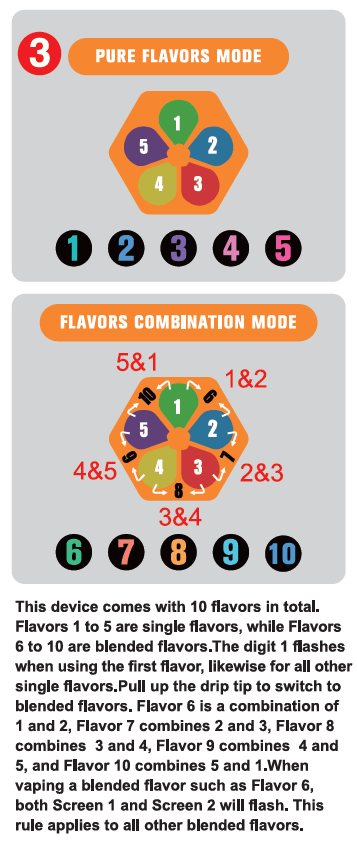
The Eco 10in1 160K runs two working modes: Pure Flavors Mode and Flavors Combination Mode. Numbers 1‑5 are pure single‑flavour options under Pure Flavors Mode. When one single flavour is active, its matching number on the screen will blink to confirm your selection. Numbers 6‑10 belong to Flavors Combination Mode. You can access blended flavours by pulling up the drip tip. Each blended flavour merges two adjacent base flavours. When you activate any blended flavour, the screen will flash the two digits corresponding to its two source flavours. For instance, selecting flavour 6 will make indicator 1 and indicator 2 flash together. This visual flashing signal works for all blended preset options. You can freely toggle between original single tastes and creative mixed flavour profiles.
Important Note
Note: If a single flavor is exhausted, the adjacent blended flavor will disappear and turn into a single. For example, when flavor 1 is used up, flavors 6 and 10 will switch to single‑flavor mode. Only flavors 7, 8 and 9 remain as mixed flavors.This rule applies to all other flavors as well.
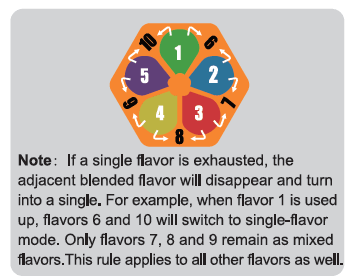
This is a critical built‑in behaviour you will encounter as e‑liquid runs down during usage. Once any base single flavour is fully depleted, every blended flavour that relies on it will automatically convert to single‑flavour operation. It will no longer deliver a mixed taste. This automatic transition happens without any manual input from the user. Always observe the flashing digits on the smart screen, so you understand whether you are vaping a blended mix or a single flavour in the later stages of device use.
Quick recap of key usage takeaways
- Complete step 1 before first use; do not leave silicone plug or sticker attached.
- Use pull‑up and twist motion on drip tip to switch between all 10 flavour choices as described in step 2.
- Read the smart display: left for battery status, right for current‑flavour e‑liquid level.
- Refer to step 3 to distinguish pure single flavours and blended combination flavours, and interpret screen flashing indicators.
- Keep the official note in mind: empty base flavours will modify the output of related blended flavours.
Whether you prefer straightforward single‑flavour hits or fun creative mixed tastes, following these official step‑by‑step instructions helps you get the full intended experience out of the Eco 10in1 160K 10‑in‑1 disposable vape.