
Tag Archive for: How To

If you’re searching for buy Fumot 15000 — also known as the Fumot Tornado 15000 — this guide covers the safest, cheapest, and most reliable way to get the authentic device. With 25ml e‑liquid, up to 15,000 puffs, LED display, airflow control, and 62 flavors, it’s one of Fumot’s most popular disposables.

Where to Buy Genuine Fumot 15000

The only trusted source for 100% original Fumot 15000 is the official Fumot online store:

👉 Official Store Page: https://szfumotvapestore.com/products/fumot-tornado-15000

👉 Official Product Page: https://szfumotvape.com/portfolio-item/tornado-15000/

Buying directly from the official channel guarantees:
  • Authentic Fumot Tornado 15000 devices
  • Full 62‑flavor selection
  • 4 nicotine strengths: 2% / 5%
  • Real LED power & oil indicators
  • 0.9Ω mesh coil & adjustable airflow
  • Factory-sealed quality control
  • No counterfeits, fake coils, or bad e‑liquid

Why Buy Fumot 15000 from the Official Store?

1. Tiered Bulk Discounts (Buy More, Save More)

  • Buy 3 → 15% OFF
  • Buy 5 → 20% OFF
  • Buy 15 → 35% OFF
  • Buy 50 → 40% OFF
  • Buy 100 → 50% OFF
Perfect for stocking up or group orders.

2. Full Specs & Flavors In Stock

Official specs (verified):
  • Puffs: Up to 15,000
  • E‑liquid: 25ml pre‑filled
  • Battery: 850mAh rechargeable
  • Charging: Type‑C fast charge
  • Display: LED power + e‑liquid indicator
  • Coil: 0.9Ω mesh coil
  • Airflow: Adjustable knob
  • Flavors: 62 available
  • Nicotine: 2%, 5%

3. Fixed Transparent Price

Retail price: €19.99 per device

No hidden fees, no markup, no fake sales.

4. Secure Checkout & Reliable Shipping

Official store supports safe payments and steady worldwide shipping, with discreet packaging.

How to Buy Fumot 15000 — Step by Step

  1. Go to the official store page:

    https://szfumotvapestore.com/products/fumot-tornado-15000

  2. Select your flavor.
  3. Choose nicotine level ( 2% / 5%).
  4. Enter quantity — discount applies automatically.
  5. Add to cart and complete checkout.

Avoid Fake Fumot 15000 Devices

Many counterfeits copy the look but use unsafe batteries, bad coils, and low‑grade e‑liquid.
Only buy from the official Fumot store to ensure real performance, flavor, and safety.
If you’re searching for buy Fumot 12000 — also known as the Digital Box 12000 — you’re in the right place. This high-capacity disposable vape with LED display, 20ml pre-filled e-liquid, and up to 12,000 puffs is one of the most popular models from Fumot. To ensure you get 100% authentic devices, avoid counterfeits, and enjoy the best pricing, here’s your complete guide.

Where to Buy Genuine Fumot 12000?

The safest and most reliable place to buy Fumot 12000 is the official Fumot online store:

👉 https://szfumotvapestore.com/products/fumot-vape-12000

Buying directly from the official channel guarantees:
  • Authentic Fumot 12000 devices only
  • ✅ Full flavor selection (49+ tastes available)
  • ✅ Correct nicotine strengths: 2% / 5%
  • ✅ Factory-sealed, quality-checked products
  • ✅ Clear LED display, mesh coil, Type‑C charging
  • ✅ No fake coils, low-quality e-liquid, or faulty batteries

Why Buy Fumot 12000 from the Official Store?

Besides authenticity, you’ll get exclusive advantages you won’t find on random third-party platforms:

1. Bulk Discounts — Buy More, Save More

The official store offers tiered discounts for Fumot 12000:
  • Buy 3 → 15% OFF
  • Buy 5 → 20% OFF
  • Buy 15 → 35% OFF
  • Buy 50 → 40% OFF
  • Buy 100 → 50% OFF

    Great for personal stock or group orders.

2. Full Flavor Availability

The official page stocks the complete lineup, including:
  • Cool Mint, Cherry Cola, Grape Ice
  • Strawberry Watermelon, Mango On Ice
  • Kiwi Passion Fruit Guava, Blue Razz Lemonade
  • Watermelon Ice, Pink Lemonade, Mixed Berries

    and many more.

3. Fixed Transparent Price

Retail price: €17.99 per device

No hidden fees, no random markup, no fake “limited sales.”

4. Secure Payment & Reliable Shipping

The official store supports major payment methods and provides stable shipping to most regions, so you receive your order safely.

Fumot 12000 Key Specs (From Official Page)

If you’re confirming before buying, here are the verified specs:
  • Puffs: Up to 12,000
  • E-liquid: 20ml pre-filled
  • Battery: 550mAh rechargeable
  • Charging: Type‑C port
  • Display: LED power & oil indicator
  • Coil: Mesh coil for rich flavor
  • Nicotine: 2% / 5%
  • Flavors: 49+ available

How to Buy Fumot 12000 Step-by-Step?

  1. Go to the official product page:

    https://szfumotvapestore.com/products/fumot-vape-12000

  2. Select your favorite flavor.
  3. Choose nicotine level (2% or 5%).
  4. Enter quantity and enjoy automatic bulk discounts.
  5. Add to cart and complete checkout.

How to Avoid Fake Fumot 12000?

Many counterfeit devices look similar but use poor coils, fake batteries, and unsafe e-liquid.
Only buy from the official Fumot store to guarantee real performance, flavor, and safety. If you have any concerns regarding the product, please verify your product on the official FUMOT verification page.
The Vibe 28000 Pod is an open-system, refillable pod vape designed for long-lasting use and customizable flavor. Follow the official 4-step tutorial below to get started quickly and easily.

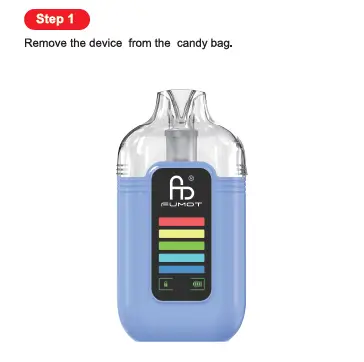
Step 1: Remove the device from the candy bag.

step-1-vibe-28000-pod-tutorial
Begin with unboxing your Vibe 28000 Pod:
  1. Locate the sealed candy bag packaging.
  2. Open the bag and remove the entire device assembly (main body + attached pod).
This step ensures your device is clean and ready for setup.

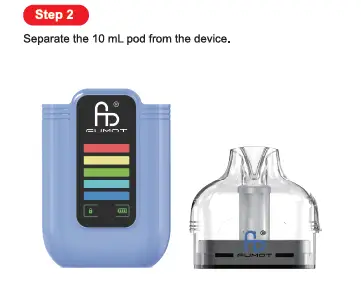
Step 2: Separate the 10 mL pod from the device.

step-2-vibe-28000-pod-tutorial
Prep the pod for refilling:
  1. Hold the main device body firmly.
  2. Pull the 10 mL pod (top component) straight upward to separate it from the base.
This exposes the pod for e-liquid filling and preparation.

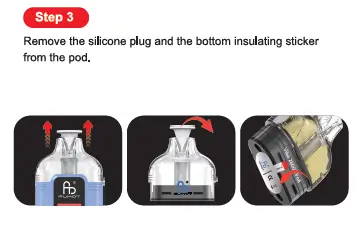
Step 3: Remove the silicone plug and the bottom insulating sticker from the pod.

step-3-vibe-28000-pod-tutorial
Clear the pod’s protective components:
  1. Pull the silicone plug from the top of the pod (covering the mouthpiece/fill port area).
  2. Peel off the insulating sticker from the bottom of the pod (the part that connects to the main device).
This step activates the pod’s coil and removes shipping safety measures.

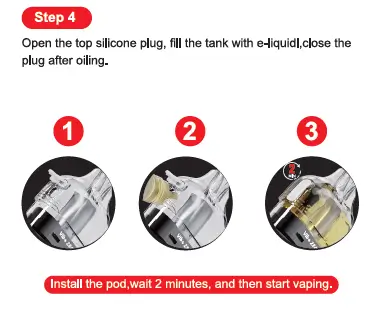
Step 4: Open the top silicone plug, fill the tank with e-liquid, close the plug after oiling.

step-4-vibe-28000-pod-tutorial
Refill the pod with your preferred e-liquid:
  1. Open the top silicone plug to expose the fill port.
  2. Carefully inject e-liquid into the 10 mL tank (do not overfill).
  3. Close the silicone plug firmly to seal the tank.
  4. Reinstall the pod back into the main device body.
  5. Critical Tip: Wait 2 full minutes before vaping to let the e-liquid soak into the coil (priming), preventing dry hits.


Key Vibe 28000 Pod Highlights

  • Refillable Open System: Use your favorite e-liquids with the 10 mL pod tank.
  • Replaceable Pods: Swap pods for new flavors or coils easily.
  • Digital Display: The device features a battery level indicator for quick checks.
  • Type-C Charging: Recharge the built-in battery via the base port to finish all e-liquid.
For full specs and replacement pod details, visit the official Fumot Vibe 28000 Pod product page.
How-to-Use-Leopard-40K-Refillable
The Leopard 40K Refillable is a premium refillable pod system, built for long-lasting use, customizable flavor, and family-friendly safety. Follow the official 4-step process below to set up and start vaping seamlessly.

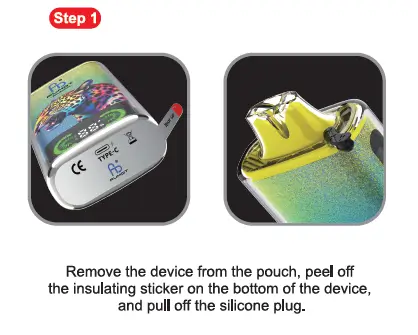
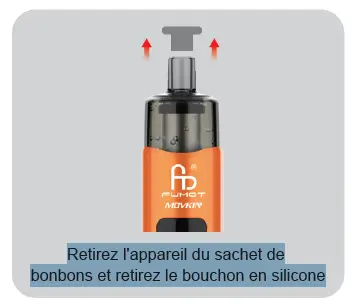
Step 1: Remove the device from the pouch, peel off the insulating sticker on the bottom of the device, and pull off the silicone plug.

Start with unboxing and initial prep:
  1. Take the Leopard 40K Refillable out of its protective pouch packaging.
  2. Locate the insulating sticker on the bottom of the device and peel it off completely to activate the battery.
  3. Pull off the silicone plug covering the mouthpiece to remove shipping protection.

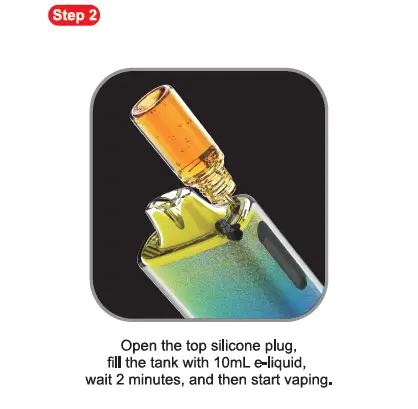
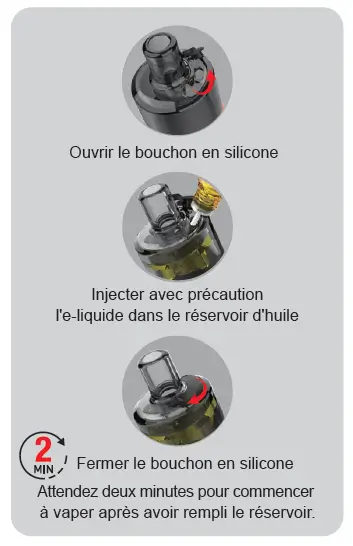
Step 2: Open the top silicone plug, fill the tank with 10mL e-liquid, wait 2 minutes, and then start vaping.

Refill the tank and prime the coil for optimal performance:
  1. Open the silicone plug on the top of the device to expose the filling hole.
  2. Carefully inject 10mL of your preferred e-liquid into the tank (do not overfill to prevent leaks).
  3. Close the top silicone plug firmly to seal the tank.
  4. Critical Tip: Wait 2 full minutes before vaping. This allows e-liquid to fully soak into the coil (priming), preventing dry hits and extending coil life.

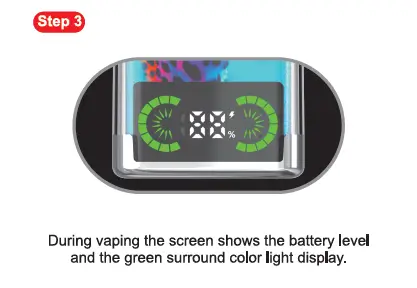
Step 3: During vaping the screen shows the battery level and the green surround color light display.

Monitor your device while in use:
  • When you take a draw, the device’s smart screen will display your real-time battery level, paired with a green surround color light to confirm active use.
  • This visual feedback lets you track battery status at a glance, so you never run out of power unexpectedly.

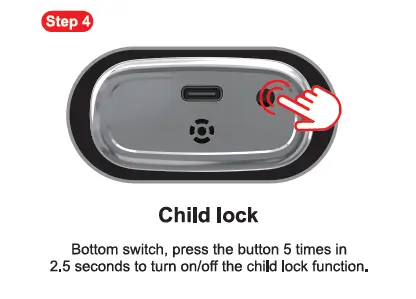
Step 4: Child lock

Secure the device with the built-in child safety feature:
  • Locate the switch/button on the bottom of the device.
  • Press the button 5 times within 2.5 seconds to turn the child lock function on or off.
  • This prevents accidental activation by children, keeping your device safe for household use.

Key Leopard 40K Refillable Highlights

  • Refillable Design: Reuse the device by refilling the 10mL tank with your favorite e-liquids.
  • Smart Display: Real-time battery tracking with green surround lighting for clear visibility.
  • Child Lock: Built-in safety feature to prevent unauthorized use.
  • Rechargeable: Type-C port (on the bottom) lets you recharge the battery to finish all e-liquid.
For full specs and replacement coil details, visit the official Fumot Leopard 40K Refillable product page.
how-to-use-altera-14k-x
The Altera 14K X is a high-performance refillable Direct-to-Lung (DTL) vape, the refillable version of the Altera 14K, designed for cloud chasers who want long-lasting use and customizable flavor. Follow the official 4-step process below (matching the product tutorial) to set up and start vaping.

Step 1: Remove the device from the candy bag, pull off the silicone plug.

Start with unboxing prep:
  1. Take the Altera 14K X out of its protective candy bag packaging.
  2. Locate the silicone plug on the mouthpiece (top of the device) and pull it off completely.
This removes the shipping protection and prepares the device for e-liquid filling.

Step 2: Open the top silicone plug, fill the e-liquid.

how-to-use-altera-14k-x-2
Refill the device with your preferred e-liquid:
  1. Locate the top silicone plug (covering the filling hole on the device’s top end).
  2. Open the silicone plug to expose the fill port.
  3. Carefully inject e-liquid into the tank (do not overfill to avoid leaks).
  4. Close the top silicone plug firmly to seal the tank.

Step 3: Press the bottom round function key three times to turn on or off, slide bottom airflow control switch.

how-to-use-altera-14k-x-3
Activate the device and adjust airflow for DTL vaping:
  1. Find the round function key on the device’s bottom. Press it three times to power the device on or off.
  2. Locate the airflow control switch on the bottom, then slide it open to your preferred airflow level (wider for bigger clouds, tighter for more flavor).

Step 4: Press the bottom function key once to switch ECO/BOOST modes as preferred, place device upright & stand 5 mins before vape.

Final setup and priming:
  1. Press the bottom function key once to toggle between ECO Mode (smooth, long-lasting draws) and BOOST Mode (max power for dense DTL clouds).
  2. Place the device upright and let it rest for 5 full minutes—this allows e-liquid to fully soak into the coil (priming), preventing dry hits and ensuring optimal flavor.
  3. After 5 minutes, take a direct-to-lung draw to start vaping. (We recommend waiting 5 minutes, but you may also use it immediately.)

Key Altera 14K X Highlights

  • Refillable Design: Reuse the device by refilling the tank with your favorite e-liquids.
  • DTL Optimized: Built for direct-to-lung inhales, delivering thick, satisfying clouds.
  • Dual Modes: ECO for casual use, BOOST for cloud-chasing sessions.
  • Rechargeable: Type-C port (on the bottom) lets you recharge the battery to finish all e-liquid.
For full specs and flavor compatibility, check the official Fumot Altera 14K X details.
how-to-use-altera-14k
The Altera 14K is a high-performance Direct-to-Lung (DTL) disposable vape designed for cloud chasers and flavor enthusiasts alike. With up to 14,000 puffs, dual power modes, and customizable airflow, it delivers a seamless DTL experience—all in a ready-to-use disposable design. Follow the official 3-step process below to start vaping instantly.


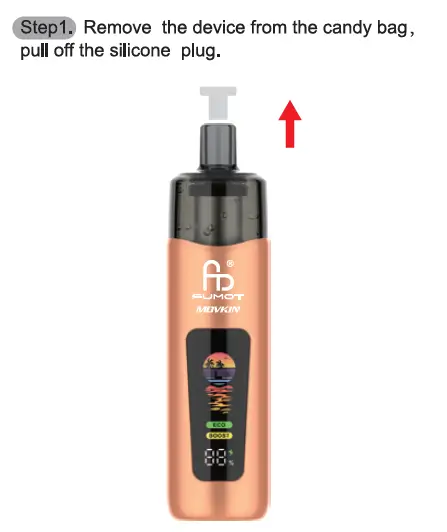
Step 1: Remove the device from the candy bag, pull off the silicone plug.

how-to-use-altera-14k-1
Begin with the simple unboxing prep:
  1. Take the Altera 14K out of its protective candy bag packaging.
  2. Locate the silicone plug on the top of the device and pull it off completely.
This removes the shipping protection, making the device ready for activation.


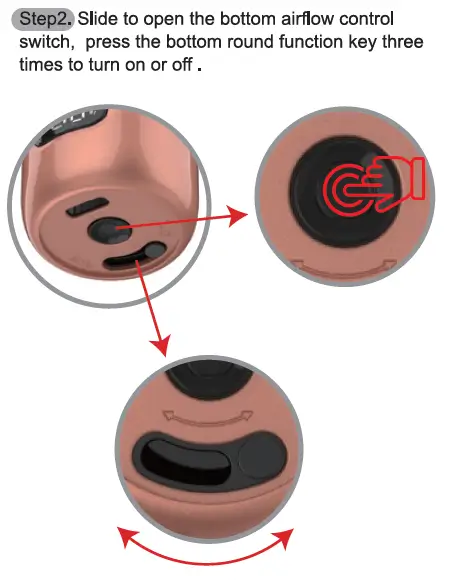
Step 2: Slide to open the bottom airflow control switch, press the bottom round function key three times to turn on or off.

Unlock the device and customize airflow for your DTL style:
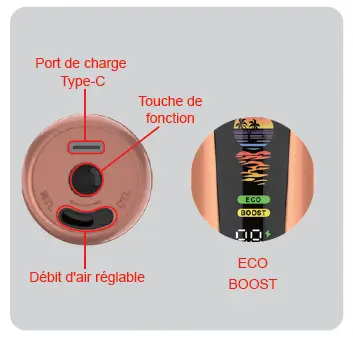
  1. Find the airflow control switch on the device’s bottom and slide it open (adjust to your preferred airflow intensity for bigger clouds or concentrated flavor).
  2. Locate the round function key on the bottom, then press it three times to power the device on or off.
This step is critical for activating the device and setting up the airflow for smooth lung hits.


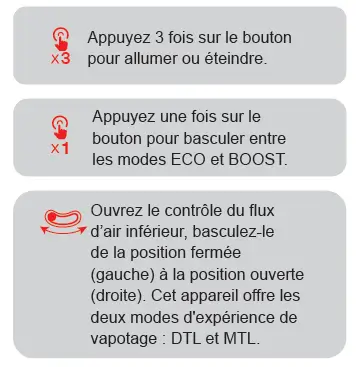
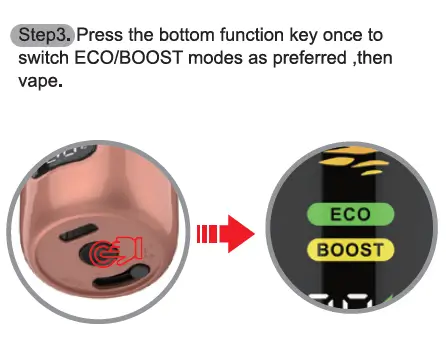
Step 3: Press the bottom function key once to switch ECO/BOOST modes as preferred, then vape.

how-to-use-altera-14k-3
Tailor your performance and start vaping:
  1. Press the bottom function key a single time to toggle between ECO Mode (for extended battery life and smooth draws) and BOOST Mode (for maximum power and dense DTL clouds). The device’s display clearly indicates the active mode.
  2. Take a direct-to-lung draw from the mouthpiece to enjoy your vape.


Key Altera 14K Highlights

  • DTL Design: Optimized for direct-to-lung inhales, delivering thick, satisfying clouds.
  • 14,000 Puffs: Long-lasting performance backed by a 17ml pre-filled tank and 1200mAh rechargeable battery (Type-C port included).
  • Dual Modes: ECO for casual use, BOOST for cloud-chasing sessions.
For full specs and flavor options, visit the official Fumot Altera 14K product page.

Please refer to the blog post for details on the differences between DTL Vape and MTL Vape.


About Fumot Tech

Shenzhen Fumot Technology Co., Ltd specializes in the production, research, and sales of disposable vape devices and customized electronic cigarette hardware. Over the past decade, Fumot has introduced several vape brands, including FumotSupbliss, and Vome, earning the admiration of a vast consumer base.

We pride ourselves on pioneering hardware designs and infusing the most delectable flavors into our devices. With our formidable research and development, manufacturing, and marketing capabilities, our products have reached major markets, including North America, Southeast Asia, the UK, Europe, and Russia. Our mission is to provide customers with the finest disposable vape devices!

Be sure to share your vaping story and tag us on social media with the tags #fumot_official, #fumotvape,  #supblissvape, or #vomevape.

Follow us on FacebookInstagramYouTube, and X.

how-to-use-matelix-pro
The Matelix Pro is a premium, highly customizable refillable vape system featuring dual power modes, adjustable airflow, and a smart display. Below is the step-by-step tutorial, ensuring error-free setup and use.

What You’ll Need First

  • 1 x Fumot Matelix Pro (unboxed from its protective pouch)
  • One 10ml bottle of e-liquid (compatible with refillable pod systems)

Step 1: Remove the device from the pouch.

how-to-use-matelix-pro-1
Initiate your Matelix Pro setup with the foundational unboxing step:
  1. Locate the sealed, protective pouch that encases the full Matelix Pro device (main body + attached cartridge).
  2. Open the pouch and remove the entire device assembly to begin the preparation process.
This step ensures the device remains free from dust, debris, and moisture before any handling or assembly.

Step 2: Separate the cartridge from the device, remove the insulating sticker and silicone plug from the cartridge.

how-to-use-matelix-pro-2-1
This step focuses on prepping the cartridge, with clear distinction between the two protective components—note their different locations as specified in the official guide:
  1. Grip the Matelix Pro’s main body firmly, then pull the cartridge (the top pod component) straight upward to separate it completely from the device.
  2. Locate the insulating sticker (a thin, protective label) on the base of the cartridge (the area that connects to the main device) and peel it off—this deactivates the shipping safety lock for the coil.
  3. Locate the silicone plug (a soft, protective cap) that covers the cartridge’s mouthpiece (drip tip) (the top opening for vaping) and remove it.
Critical Clarification: The silicone plug removed here is exclusively for the mouthpiece, and the insulating sticker is on the cartridge base. The e-liquid filling hole is not accessed or uncovered in this step.

Step 3: Open the silicone plug, fill the tank with one 10ml bottles of e-liquid, wait 2 minutes, and then start vaping.

how-to-use-matelix-pro-3
  1. On the side of the cartridge (not the top mouthpiece), locate the small, dedicated silicone plug that covers the e-liquid filling hole. Open the side silicone plug to fully expose the filling port.
  2. Position the nozzle of your 10ml e-liquid bottle directly over the side filling hole, then carefully inject the e-liquid into the cartridge’s tank. Do not overfill—stop once the e-liquid reaches the tank’s maximum fill line to prevent leaks.
  3. Close the side silicone plug firmly over the filling hole to create an airtight seal.
  4. Reattach the fully prepared cartridge to the Matelix Pro’s main device body, pressing down until it clicks securely into place.
Non-Negotiable Tip: Wait 2 full minutes before starting to vape. This critical waiting period allows the e-liquid to fully soak into the cartridge’s coil (coil priming), eliminating the risk of dry hits and extending the coil’s service life.

Vaping Mode: BOOST–ECO

The Matelix Pro is engineered with two distinct power modes to suit different vaping preferences, as outlined in the official guide:
  • BOOST Mode (26–40W): Delivers high power output for dense, voluminous clouds and amplified flavor intensity—ideal for cloud chasers.
  • ECO Mode (15–25W): Optimizes power usage for extended battery life and smoother, milder draws—perfect for casual daily use.
A key convenience feature: the device automatically remembers the power level you last used in each mode, so you can switch between BOOST and ECO without re-adjusting settings.

Theme

how-to-use-matelix-pro-5
Customize your Matelix Pro’s display with three unique, pre-loaded themes (each with distinct background graphics), as specified in the official manual:
  1. Normal: A clean, minimalist interface that prioritizes readability of core metrics (power, mode, battery).
  2. Summer Colorful: A vibrant, dynamic theme with bold color schemes and lively background animations.
  3. Robot: A playful, space-inspired theme featuring futuristic robot and cosmic graphics.
Each theme cycles through unique background visuals, letting you personalize the device’s appearance to match your style.

Button Operation Instructions

how-to-use-matelix-pro-6
All core functions of the Matelix Pro are controlled via the single side button—follow these exact official operation steps for seamless use:
  1. 1 click: Wake up the device’s display (activates the screen from sleep mode).
  2. 2 clicks: Switch between BOOST and ECO vaping modes; the device retains your last power setting for each mode.
  3. 3 clicks within 2 seconds: Enter power adjustment mode. Each subsequent click increases power by 1W (for rapid fine-tuning); power levels cycle once the maximum is reached.
  4. 4 clicks within 3 seconds: Cycle through the three display themes (Normal → Summer Colorful → Robot).
  5. 5 clicks within 3 seconds: Power the device on or off (the primary power control function).
  6. 10 clicks within 5 seconds: Clear the device’s puff count and reset the initialization display—ideal for tracking fresh usage cycles.

Adjustment of Airflow

how-to-use-matelix-pro-7
Fine-tune your vaping experience with the Matelix Pro’s intuitive airflow adjustment (located on the device’s side):
  1. Locate the airflow adjustment slider on the side of the Matelix Pro’s main body.
  2. Slide the control to your desired position:
    • Tighter airflow: Concentrates flavor and delivers a more pronounced throat hit.
    • Wider airflow: Produces cooler vapor, smoother draws, and larger cloud production.
This customizable airflow pairs perfectly with the BOOST/ECO modes to create a tailored experience for every vaper.

Key Details From the Matelix Pro Product Page

To maximize the performance and lifespan of your Matelix Pro, reference these official product specifications:
  • Coil System: Optimized for 0.6Ω mesh coils, which deliver consistent atomization across both BOOST and ECO modes.
  • Smart Display: A 0.96-inch high-resolution screen shows real-time data including power level, mode, battery percentage, coil resistance, and puff count.
  • Build Quality: A sleek, durable design that balances portability with robust construction, perfect for daily use and on-the-go vaping.
For full specifications, flavor compatibility, and replacement coil details, visit the official Fumot Matelix Pro product page.

The Fumot Matelix Pro’s precision design is engineered for both performance and convenience. By following these official steps, you’ll ensure leak-free refills, optimal coil performance, and full access to the device’s customizable features.

Whether you’re powering through cloud sessions in BOOST mode or enjoying a relaxed vape in ECO mode, the Matelix Pro delivers a polished, personalized experience—when used exactly as outlined in the official guide.


About Fumot Tech

Shenzhen Fumot Technology Co., Ltd specializes in the production, research, and sales of disposable vape devices and customized electronic cigarette hardware. Over the past decade, Fumot has introduced several vape brands, including FumotSupbliss, and Vome, earning the admiration of a vast consumer base.

We pride ourselves on pioneering hardware designs and infusing the most delectable flavors into our devices. With our formidable research and development, manufacturing, and marketing capabilities, our products have reached major markets, including North America, Southeast Asia, the UK, Europe, and Russia. Our mission is to provide customers with the finest disposable vape devices!

Be sure to share your vaping story and tag us on social media with the tags #fumot_official, #fumotvape,  #supblissvape, or #vomevape.

Follow us on FacebookInstagramYouTube, and X.

how-to-use-eco-2in1-refillable
The Eco 2in1 Refillable stands out as a revolutionary dual-flavor, refillable vape system, engineered for personalized vaping and long-lasting performance. Its core appeal lies in the ability to enjoy two distinct 10ml e-liquid flavors in one device, paired with intuitive operation. Below is the step-by-step tutorial with enhanced focus on the filling hole’s precise location—a critical detail for error-free use.

What You’ll Need First

  • 1 x Fumot Eco 2in1 Refillable (unboxed from its protective pouch)
  • 10ml e-liquid bottles (mandatory: flavors must match the labels printed on the device)

Step 1: Remove the device from the pouch.

how-to-use-eco-2in1-refillable-1
Begin with the foundational unboxing step:
  1. Locate the sealed, protective pouch that houses the Eco 2in1 Refillable.
  2. Open the pouch and remove the device in its entirety.
This step ensures your device is free from dust and moisture before you begin the critical setup and refilling process.

Step 2: Lift the drip tip upward and rotate it 90° to see the black silicone plug. Open the black silicone plug to display the filling hole.

This step is where you’ll access the precise location of the filling hole—pay close attention to avoid misalignment or leaks:
  1. Grip the drip tip (the top mouthpiece of the device) firmly and lift it straight upward to detach it from the device’s main body.
  2. Rotate the lifted drip tip 90 degrees clockwise or counterclockwise; this action exposes a black silicone plug situated directly on the top surface of the device’s tank compartment (the central area where the drip tip attaches).
  3. Peel back or lift the black silicone plug to fully reveal the filling hole, which is positioned directly beneath this silicone plug on the tank’s top surface—this is the only port designed for e-liquid injection.
Critical Note: The filling hole is recessed slightly within the tank compartment, making the black silicone plug its only cover—never attempt to inject e-liquid into any other opening on the device.

Step 3: Before filling, ensure the flavor of the 10ml e-liquid bottle matches the flavor labeled on the device, then inject the liquid accordingly.

how-to-use-eco-2in1-refillable-3
With the filling hole fully exposed (at its location beneath the opened black silicone plug), follow these steps for precise refilling:
  1. First, cross-verify that the flavor of your 10ml e-liquid bottle matches the flavor label printed directly on the device’s tank adjacent to the filling hole. For dual-flavor use, confirm each e-liquid matches its corresponding tank’s label (the device features two separate tanks, each with its own filling hole in the same location—beneath its respective black silicone plug).
  2. Position the nozzle of your e-liquid bottle directly over the exposed filling hole (the port revealed in Step 2, beneath the black silicone plug).
  3. Slowly and carefully inject the e-liquid into the filling hole, taking care not to overfill the tank—stop when the e-liquid level is just below the rim of the filling hole to prevent leakage.
  4. After filling, press the black silicone plug firmly back over the filling hole to seal it completely.
This strict focus on the filling hole’s location and flavor matching ensures optimal performance and prevents flavor contamination between the device’s dual tanks.

Step 4: Lift the drip tip upward, then twist it to switch flavors.

how-to-use-eco-2in1-refillable-4
Leverage the device’s dual-flavor design—still centered on the same top compartment where the filling holes are located:
  1. Lift the drip tip upward from the device’s main body (the same motion used to access the filling holes in Step 2).
  2. Twist the drip tip to the left or right to align its internal airway with the filling hole/tank of your desired flavor. The device’s transparent tank design lets you clearly see which filling hole/tank the drip tip is aligned with, ensuring you select the correct flavor.
  3. Press the drip tip back down firmly to lock it in place over the chosen filling hole/tank.
This design ties the flavor-switching mechanism directly to the filling hole locations, making it easy to associate each tank with its corresponding flavor.

Step 5: Remove the silicone drip tip and bottom sticker before use. When vaping, the screen displays battery level and brand logo, and the tank is lighted.

how-to-use-eco-2in1-refillable-5
Complete your setup before first use, with a final check of the filling hole area:
  1. Double-check that the black silicone plugs (covering both filling holes) are securely closed, then remove the protective silicone cover from the drip tip itself (a separate protective layer from the filling hole’s silicone plug).
  2. Peel off the insulating sticker from the device’s bottom base—this sticker prevents accidental activation during shipping.
  3. Once prepared, take a gentle draw from the drip tip to activate the device:
    • The digital screen on the device’s front will display the current battery level and Fumot’s brand logo.
    • The tank (including the area surrounding the filling holes) will light up, visually confirming the device is active and the chosen flavor’s tank is in use.

Key Details From the Eco 2in1 Refillable Product Page

To maximize your device’s lifespan and performance, keep these details in mind—all tied to protecting the filling hole and dual-tank system:
  • Dual 10ml Tanks: Each tank features its own filling hole (located beneath a dedicated black silicone plug), totaling 20ml of e-liquid capacity.
  • Type-C Charging: A port on the device’s base lets you recharge the built-in battery, ensuring you use every drop of e-liquid you inject into the filling holes.
  • Leak-Proof Design: The black silicone plugs covering the filling holes are engineered to create an airtight seal, preventing e-liquid from escaping during use or transport.
For full specifications and flavor options, visit the official Fumot Eco 2in1 Refillable product page.

Mastering the precise location of the filling hole (beneath the black silicone plug on the tank’s top surface) is the key to using the Fumot Eco 2in1 Refillable correctly. By following these official steps—with strict attention to where the filling hole is situated and how to access it—you’ll avoid leaks, ensure flavor purity, and unlock the full potential of the device’s dual-flavor functionality.

Whether you’re refilling for the first time or switching between your two favorite flavors, the Eco 2in1 Refillable’s intuitive design (centered on its clearly marked filling holes) makes for a hassle-free vaping experience every time.
About Fumot Tech

Shenzhen Fumot Technology Co., Ltd specializes in the production, research, and sales of disposable vape devices and customized electronic cigarette hardware. Over the past decade, Fumot has introduced several vape brands, including FumotSupbliss, and Vome, earning the admiration of a vast consumer base.

We pride ourselves on pioneering hardware designs and infusing the most delectable flavors into our devices. With our formidable research and development, manufacturing, and marketing capabilities, our products have reached major markets, including North America, Southeast Asia, the UK, Europe, and Russia. Our mission is to provide customers with the finest disposable vape devices!

Be sure to share your vaping story and tag us on social media with the tags #fumot_official, #fumotvape,  #supblissvape, or #vomevape.

Follow us on FacebookInstagramYouTube, and X.

how-to-use-leopard-40k-pod
The Leopard 40K Pod (a refillable and replaceable, high-capacity vape pod with 40,000-puff durability) is designed for flexibility and long-term use. Below is the official step-by-step guide to set up and use your Leopard 40K Pod correctly.


What You’ll Need First

  • 1 x Fumot Leopard 40K Pod (unboxed from its pouch)
  • Your preferred e-liquid (compatible with refillable pod systems)


Step 1: Remove the Device & Extract the Cartridge

how-to-use-leopard-40k-pod-1
Start by prepping the device for filling:
  1. Remove the Leopard 40K Pod from its packaging pouch.
  2. Extract the cartridge (the top component) from the main device body (follow the arrow in the screenshot to separate the two parts).
This step lets you access the cartridge’s tank for e-liquid filling.


Step 2: Fill the Tank (With Critical Waiting Tip)

how-to-use-leopard-40k-pod-2
Follow these steps to fill the cartridge without leaks, then prep the coil:
  1. Open the silicone plug (located on the cartridge) to expose the fill port.
  2. Carefully inject your chosen e-liquid into the tank (do not overfill—stop at the tank’s max line).
  3. Close the silicone plug firmly to seal the tank.
  4. Reattach the cartridge to the main device body.
Critical Tip: Wait two minutes to start vaping after filling the tank. This lets e-liquid soak into the coil (called “priming”), which prevents dry hits and extends the coil’s lifespan.


Step 3: Understand the Vaping Display

how-to-use-leopard-40k-pod-3
When you start using the Leopard 40K Pod:
  • During vaping, the device’s screen will show the current battery level.
  • A green surround color light will activate (visible on the screen’s edge) to confirm the device is in use.
This display keeps you informed of your battery status at a glance—no guessing when to recharge.


Step 4: Use the Child Lock Function

how-to-use-leopard-40k-pod-4
The Leopard 40K Pod includes a child lock for safety:
  1. Locate the bottom switch (on the main device body).
  2. Press the button 5 times within 2.5 seconds to turn the child lock function on or off.
This feature prevents accidental activation by children, aligning with the device’s safety-focused design (per Fumot’s product page).


Key Details From the Leopard 40K Pod

To get the most out of your device:
  • Puff Capacity: Up to 40,000 puffs (one of the longest-lasting refillable pods on the market).
  • Battery: Rechargeable (use the Type-C port on the device to top up power).
  • Flavor Compatibility: Works with all standard e-liquids—pair it with your favorite flavors for consistent, rich vapor.
The Fumot Leopard 40K Pod balances convenience (refillable design) and durability (40,000 puffs). By following these official steps (matching the device’s tutorial screenshot), you’ll ensure great flavor, long coil life, and safe use.
For more details on the Leopard 40K Pod, visit the official product page.


About Fumot Tech

Shenzhen Fumot Technology Co., Ltd specializes in the production, research, and sales of disposable vape devices and customized electronic cigarette hardware. Over the past decade, Fumot has introduced several vape brands, including FumotSupbliss, and Vome, earning the admiration of a vast consumer base.

We pride ourselves on pioneering hardware designs and infusing the most delectable flavors into our devices. With our formidable research and development, manufacturing, and marketing capabilities, our products have reached major markets, including North America, Southeast Asia, the UK, Europe, and Russia. Our mission is to provide customers with the finest disposable vape devices!

Be sure to share your vaping story and tag us on social media with the tags #fumot_official, #fumotvape,  #supblissvape, or #vomevape.

Follow us on FacebookInstagramYouTube, and X.

how-to-use-phantom-x
Welcome to your ultimate guide to the Phantom X vape device—where cutting-edge design meets user-centric functionality. Before diving into the step-by-step setup, let’s highlight what makes the Phantom X stand out from the crowd:

Key Features & Advantages of the Phantom X

  • 10ml Large-Capacity Cartridge: Minimizes frequent refills, so you spend less time topping up and more time enjoying your vape.
  • Magnetic Suction Assembly: Effortlessly attach/detach the cartridge with a secure, tool-free magnetic connection—no fumbling with threads or clips.
  • BOOST & NORM Dual Modes: Tailor your experience: NORM mode for smooth, all-day use; BOOST mode for intensified vapor and bold flavor.
  • Intuitive Digital Display: Track battery life, current mode, and usage at a glance for full control of your session.
  • Child Lock Safety Feature: Prevent accidental activation with a quick 5-tap lock, making it safe for households with kids or on-the-go carry.

Step 1: Unbox & Prep Your Device

how-to-use-phantom-x-1

Take the device out of the package, remove the bottom sticker and the top silicone plug from the cartridge.

Why it matters: The Phantom X’s protective packaging design keeps your device and cartridge clean during transit. Removing these barriers ensures your hardware is primed for optimal performance right out of the box.


Step 2: Refill the Cartridge

Open the silicone plug of the cartridge, fill the 10ml liquid, close the silicone plug and wait for 2 mins then vape it directly.

Breakdown of this step for clarity:

  1. Open the silicone plug on the cartridge to access the filling port.
  2. Fill the cartridge with up to 10ml of your preferred e-liquid (take care not to overfill).
  3. Close the silicone plug tightly, then wait 2 minutes.

    Pro tip: The 10ml large capacity means fewer refills, while the leak-resistant silicone plug keeps your e-liquid secure. Waiting 2 minutes lets the coil fully saturate, preventing dry hits and ensuring consistent flavor—an advantage of the Phantom X’s optimized coil design.


Step 3: Switch Between Vaping Modes

how-to-use-phantom-x-3
Press the side switch of the device to switch between BOOST and NORM modes for distinct vaping experiences.
  • NORM Mode: Perfect for a balanced, everyday vaping session with consistent vapor and flavor—ideal for casual use or longer sessions.
  • BOOST Mode: Unleashes a more powerful output for richer vapor production and intensified flavor profiles, great for cloud chasers or bold flavor enthusiasts.

    Why it’s a win: The dual-mode system lets you adapt to any mood or setting, from relaxed daytime vaping to social sessions where you want to make an impression.


Step 4: Assemble & Start Vaping

how-to-use-phantom-x-4

Combine the cartridge with device by magnetic suction and then use it.

The Phantom X advantage: The magnetic suction design makes assembly effortless—simply align the cartridge with the device body, and the magnetic force will lock them together securely. This tool-free setup means you can swap cartridges or clean your device in seconds, with no risk of cross-threading or damage.


Child Lock: Safety First

how-to-use-phantom-x-5

The Phantom X includes a built-in child lock for peace of mind. To control this feature:

Press the Function Key 5 times within 2.5 seconds to turn the child lock on and off.

Why it matters: This safety feature prevents accidental activation by children or unintended use when your device is in a bag or pocket. It’s a critical advantage for vapers who prioritize safety without sacrificing convenience.


With these straightforward steps and the Phantom X’s premium features, you’re all set to enjoy a tailored, hassle-free vaping experience. For best results, pair it with premium Fumot Nic Salts and keep the device clean to maintain performance over time.
About Fumot Tech

Shenzhen Fumot Technology Co., Ltd specializes in the production, research, and sales of disposable vape devices and customized electronic cigarette hardware. Over the past decade, Fumot has introduced several vape brands, including FumotSupbliss, and Vome, earning the admiration of a vast consumer base.
We pride ourselves on pioneering hardware designs and infusing the most delectable flavors into our devices. With our formidable research and development, manufacturing, and marketing capabilities, our products have reached major markets, including North America, Southeast Asia, the UK, Europe, and Russia. Our mission is to provide customers with the finest disposable vape devices!

Be sure to share your vaping story and tag us on social media with the tags #fumot_official, #fumotvape,  #supblissvape, or #vomevape.

Follow us on FacebookInstagramYouTube, and X.