
Tag Archive for: How To

How-to-Use-Throne-70K-Shisha

If you have just got your Throne 70K Shisha device and are wondering how to get started correctly, this practical walkthrough covers every basic operation following the official user steps. Knowing how to use the Throne 70K Shisha properly helps you get consistent flavour output, avoid common beginner mistakes and extend your device service life
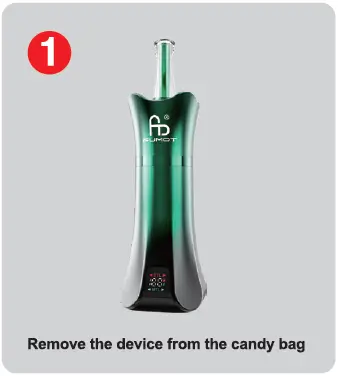
throne-70k-shisha-user-guide-1
  1. Remove the device from the candy bag Take your brand‑new Throne 70K Shisha unit out of its original candy‑style packaging bag. Inspect the exterior to make sure there is no visible damage during transit before moving to the next preparation step.
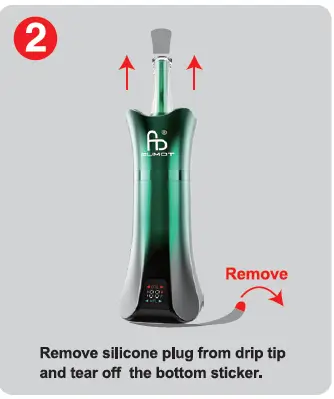
  2. throne-70k-shisha-user-guide-2

    Remove silicone plug from drip tip and tear off the bottom sticker. Pull out the silicone plug fitted on the drip tip. Then peel away the protective bottom sticker from the device. These protective covers are for transport safety; leaving them on will block airflow and stop normal operation.
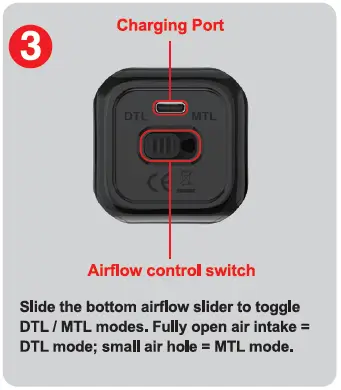
  3. throne-70k-shisha-user-guide-3

    Slide the bottom airflow slider to toggle DTL / MTL modes. Fully open air intake = DTL mode; small air hole = MTL mode. Locate the bottom panel which holds both the charging port and airflow control switch. Use your finger to slide the airflow control slider to switch between two vaping styles. DTL (Direct‑To‑Lung) mode uses fully opened air intake for large, airy clouds. MTL (Mouth‑To‑Lung) mode uses a reduced small air hole for tighter, traditional draw similar to classic shisha‑style hits. You can adjust this slider according to your personal draw preference.
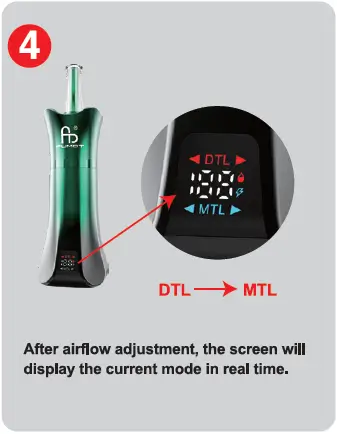
  4. After airflow adjustment, the screen will display the current mode in real time. Once you reposition the bottom airflow slider, the built‑in digital screen will instantly show whether you are running DTL or MTL mode. The on‑screen indicator removes guesswork, so you can always confirm your active mode at a quick glance.

Getting airflow settings right is one of the most important parts of enjoying the Throne 70K Shisha. DTL suits users chasing big vapour clouds, while MTL delivers a restrained, smooth draw for those who prefer milder sessions. Always double‑check the screen readout after changing the airflow slider to confirm your desired setting is active.

Before every session, do a quick visual check: confirm the drip‑tip silicone stopper and bottom protective sticker are fully removed. If you feel weak vapour or tight draws unexpectedly, revisit the bottom airflow slider and screen display to verify your mode selection. When the power runs low, utilise the charging port on the same bottom panel to recharge your unit.

Mastering how to use the Throne 70K Shisha only takes a few simple steps. Follow the official sequence above, match airflow mode to your taste, and you can enjoy stable, satisfying shisha‑style vaping each time.
how-to-use-eco-10in1-160k

If you have just got your hands on the Eco 10in1 160K multi‑flavour disposable device, you may wonder how to get the best vaping experience from its unique 10‑in‑1 flavour system. This practical guide follows the official step sequence, quotes original on‑graphic text, and adds extra explanations to help you master every operation, from unboxing to switching between single and blended flavour profiles, plus how to read the smart display screen correctly.

Step 1

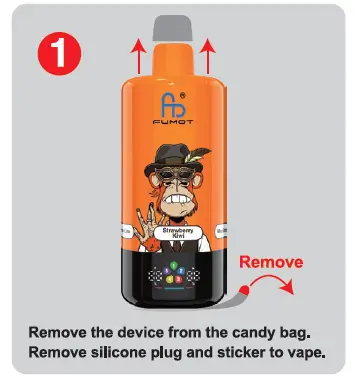
Remove the device from the candy bag. Remove silicone plug and sticker to vape.

This is your very first action after unboxing your Eco 10in1 160K. Take the unit out of its original candy‑style packaging. Next, peel off the protective sticker and pull out the silicone plug on top of the mouthpiece. These protective parts are installed for shipping protection. If you skip this step, airflow will be blocked, which can lead to weak draws or no vapour output. Remove both items fully before you take your first puff.

Step 2

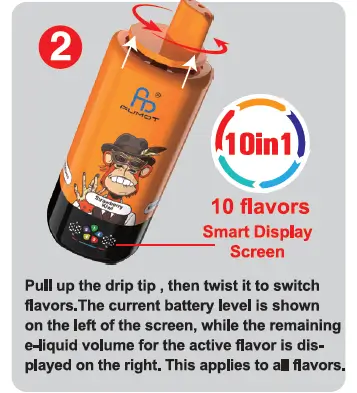
Pull up the drip tip , then twist it to switch flavors.The current battery level is shown on the left of the screen, while the remaining e‑liquid volume for the active flavor is displayed on the right. This applies to all flavors.

how-to-use-eco-10in1-160k-step-2

After finishing step 1, you can start changing flavours. Lift the drip tip upwards, and rotate it to cycle through available flavour selections. The built‑in smart display gives real‑time device metrics. The left section always shows your remaining battery power. The right‑hand reading reflects leftover e‑liquid for whichever flavour you have selected at that moment. This screen display function works consistently for every one of the 10 built‑in flavours, for both pure single flavours and mixed blended flavours. Checking these values regularly lets you keep track of battery life and e‑liquid consumption.

Step 3

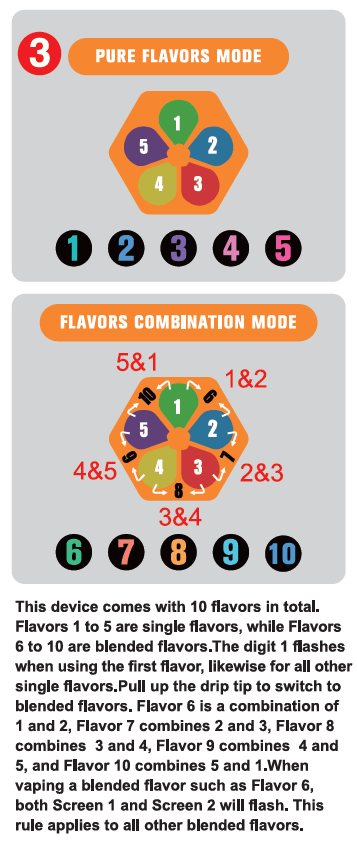
This device comes with 10 flavors in total. Flavors 1 to 5 are single flavors, while Flavors 6 to 10 are blended flavors.The digit 1 flashes when using the first flavor, likewise for all other single flavors.Pull up the drip tip to switch to blended flavors. Flavor 6 is a combination of 1 and 2, Flavor 7 combines 2 and 3, Flavor 8 combines 3 and 4, Flavor 9 combines 4 and 5, and Flavor 10 combines 5 and 1.When vaping a blended flavor such as Flavor 6, both Screen 1 and Screen 2 will flash. This rule applies to all other blended flavors.

The Eco 10in1 160K runs two working modes: Pure Flavors Mode and Flavors Combination Mode. Numbers 1‑5 are pure single‑flavour options under Pure Flavors Mode. When one single flavour is active, its matching number on the screen will blink to confirm your selection. Numbers 6‑10 belong to Flavors Combination Mode. You can access blended flavours by pulling up the drip tip. Each blended flavour merges two adjacent base flavours. When you activate any blended flavour, the screen will flash the two digits corresponding to its two source flavours. For instance, selecting flavour 6 will make indicator 1 and indicator 2 flash together. This visual flashing signal works for all blended preset options. You can freely toggle between original single tastes and creative mixed flavour profiles.

Important Note

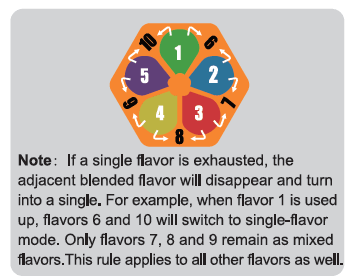
Note: If a single flavor is exhausted, the adjacent blended flavor will disappear and turn into a single. For example, when flavor 1 is used up, flavors 6 and 10 will switch to single‑flavor mode. Only flavors 7, 8 and 9 remain as mixed flavors.This rule applies to all other flavors as well.

This is a critical built‑in behaviour you will encounter as e‑liquid runs down during usage. Once any base single flavour is fully depleted, every blended flavour that relies on it will automatically convert to single‑flavour operation. It will no longer deliver a mixed taste. This automatic transition happens without any manual input from the user. Always observe the flashing digits on the smart screen, so you understand whether you are vaping a blended mix or a single flavour in the later stages of device use.

Quick recap of key usage takeaways

  1. Complete step 1 before first use; do not leave silicone plug or sticker attached.
  2. Use pull‑up and twist motion on drip tip to switch between all 10 flavour choices as described in step 2.
  3. Read the smart display: left for battery status, right for current‑flavour e‑liquid level.
  4. Refer to step 3 to distinguish pure single flavours and blended combination flavours, and interpret screen flashing indicators.
  5. Keep the official note in mind: empty base flavours will modify the output of related blended flavours.

Whether you prefer straightforward single‑flavour hits or fun creative mixed tastes, following these official step‑by‑step instructions helps you get the full intended experience out of the Eco 10in1 160K 10‑in‑1 disposable vape.

where-to-buy-fumot-40k
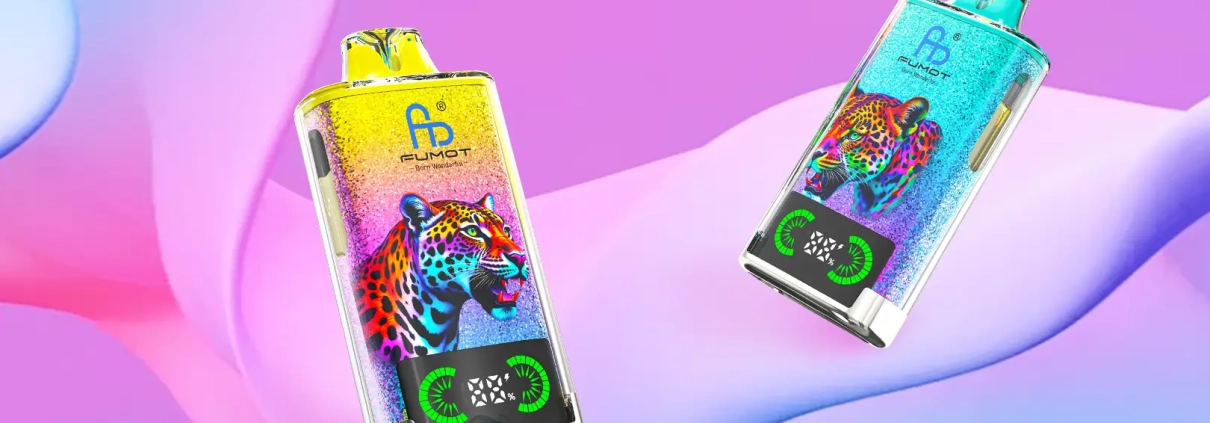
If you’re looking for where to buy Fumot 40K — also known as the Fumot Leopard 40K — this guide gives you the safest, most reliable way to purchase the genuine device. With up to 40,000 puffs, dual mesh coils, LED digital display, and RGB lighting, it’s one of Fumot’s most popular high-capacity disposables.


Where to Buy Genuine Fumot 40K (Leopard 40K)


The only trusted source for 100% original Fumot 40K is the official Fumot online store and authorized channels.

Buying from official channels guarantees:

  • ✅ Authentic Fumot Leopard 40K devices
  • ✅ Real dual mesh coils & LED display
  • ✅ Full flavor selection (up to 31 flavors)
  • ✅ 2 nicotine options: 2%, 5%
  • ✅ Factory-sealed & quality-checked
  • ✅ No counterfeits or faulty products


Why Buy Fumot 40K from the Official Store?


1. Bulk Discounts (Buy More, Save More)

  • Retail price: €26.99 per unit
  • Buy 2 or more → up to 50% OFF
  • Ideal for stocking up or group orders


2. Full Specs & Flavors In Stock


Verified official specifications:

  • Puffs: Up to 40,000
  • E-liquid: 20ml pre-filled
  • Battery: 700mAh rechargeable
  • Charging: Type‑C fast charge
  • Display: LED oil & power indicator
  • Coil: Dual mesh coils
  • Design: Transparent shell with leopard artwork
  • RGB lighting with every inhale


3. Safe & Reliable Shopping

  • Secure checkout
  • Discreet packaging
  • Stable worldwide shipping
  • Official after-sales support


How to Buy Fumot 40K — Step by Step

  1. Go to the official store page:
    https://szfumotvapestore.com/products/fumot-40k
  2. Choose your favorite flavor.
  3. Select nicotine strength (2%, 5%).
  4. Enter quantity — discount applies automatically.
  5. Add to cart and complete checkout.


Avoid Fake Fumot 40K Devices


Many counterfeits copy the appearance but use unsafe batteries, low-grade e‑liquid, and fake coils.

Buy from the official Fumot store
to ensure real performance, flavor, and safety.
how-to-use-big-puff
The Big Puff is a modular pod system that lets you enjoy a full 10ml of e-liquid with a 2ml pod (2+10 version) or use a zero-milliliter empty pod (0+10 version) for maximum flexibility. Both versions share the same core design but have slightly different setup steps. Below is the official guide for both variants, based on the product manual screenshots.


What You’ll Need

  • 1 x Fumot Big Puff battery device
  • 1 x Big Puff pod (0ml empty pod or 2ml pre-filled pod, depending on your version)
  • 1 x 10ml Big Puff e-liquid bottle (included in the kit)


Part 1: How to Use the Big Puff (0+10 Version)

This version uses an empty 0ml pod, which you fill directly from the 10ml e-liquid bottle. The setup is quick and requires just 4 steps.

how-to-use-big-puff-0+10-1.webp

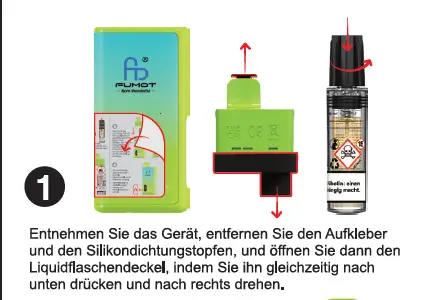
Step 1

Remove the device, remove the sticker and the silicone sealing plug, then open the liquid bottle cap by pressing it down and turning it to the right at the same time.
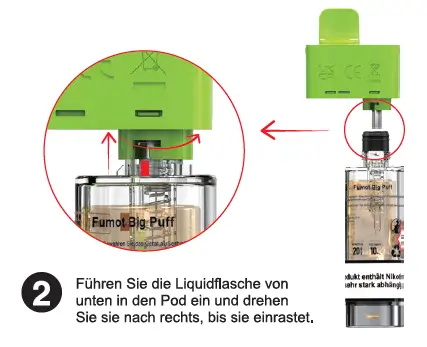
how-to-use-big-puff-0+10-2.webp

Step 2

Insert the liquid bottle into the pod from below and turn it to the right until it clicks into place.
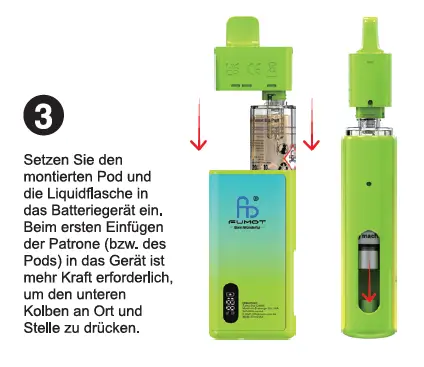
how-to-use-big-puff-0+10-3.webp

Step 3

Insert the assembled pod and liquid bottle into the battery device. When inserting the cartridge (pod) into the device for the first time, more force is required to press the lower piston into place.

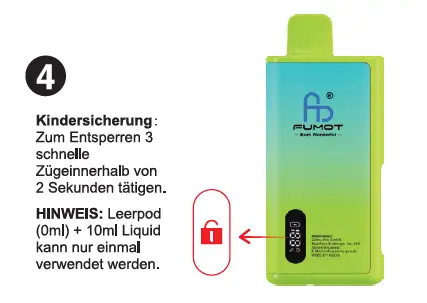
Step 4

Child Lock: To unlock, take 3 quick draws within 2 seconds.

Note: The empty pod (0ml) + 10ml liquid can only be used once.


Part 2: How to Use the Big Puff (2+10 Version)

This version uses a 2ml pod, which you top up with the 10ml e-liquid bottle. The setup has a few extra steps to prepare the pod and bottle.

how-to-use-big-puff-2+10-1.webp

Step 1

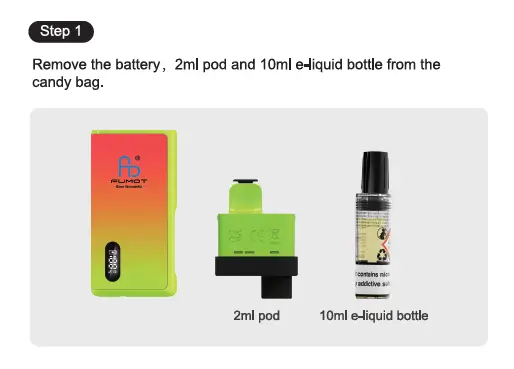
Remove the battery, 2ml pod and 10ml e-liquid bottle from the candy bag.

Step 2

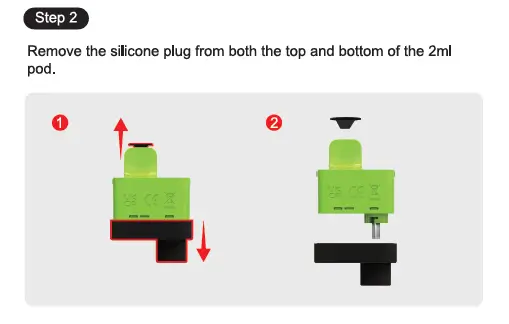
Remove the silicone plug from both the top and bottom of the 2ml pod.

how-to-use-big-puff-2+10-3.webp

Step 3

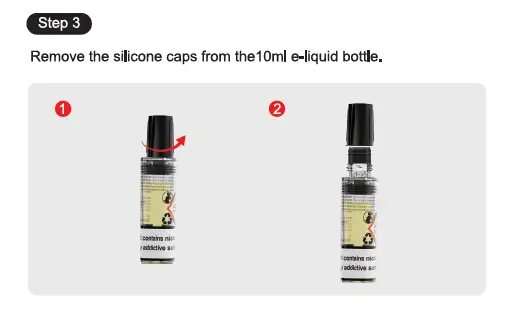
Remove the silicone caps from the 10ml e-liquid bottle.

Step 4

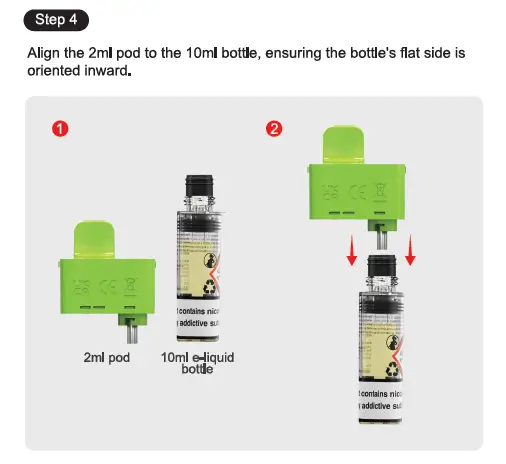
Align the 2ml pod to the 10ml bottle, ensuring the bottle’s flat side is oriented inward.

how-to-use-big-puff-2+10-5.webp

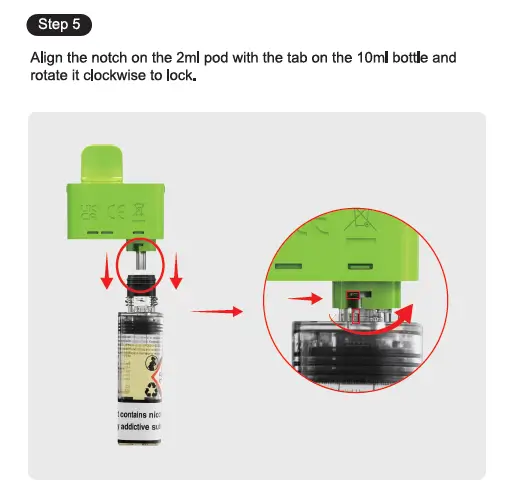
Step 5

Align the notch on the 2ml pod with the tab on the 10ml bottle and rotate it clockwise to lock.

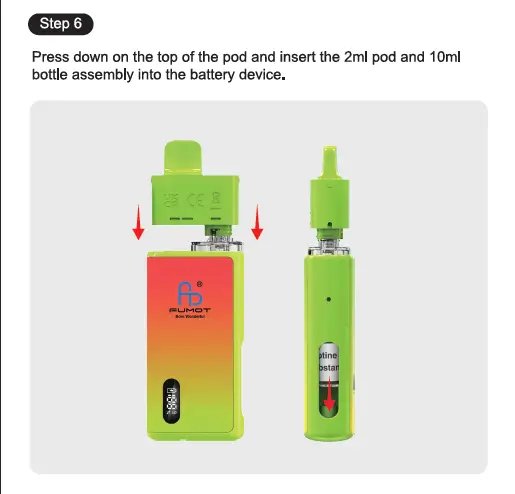
Step 6

Press down on the top of the pod and insert the 2ml pod and 10ml bottle assembly into the battery device.

Child Lock (Same as 0+10 Version)

To unlock, take 3 quick draws within 2 seconds. The LED screen on the device will show a lock icon when locked.


Pro Tips for Both Versions

  • Priming: After filling, let the pod sit for 2 minutes before vaping to ensure the coil is fully saturated.
  • Battery: The Big Puff’s LED display shows real-time battery level. Use the Type-C port on the bottom to recharge.
  • Safety: Keep the device and e-liquid out of reach of children. The child lock function prevents accidental activation.
For more details, visit the official Fumot Big Puff product page.
where-to-buy-fumot-15000
If you’re searching for buy Fumot 15000 — also known as the Fumot Tornado 15000 — this guide covers the safest, cheapest, and most reliable way to get the authentic device. With 25ml e‑liquid, up to 15,000 puffs, LED display, airflow control, and 62 flavors, it’s one of Fumot’s most popular disposables.

Where to Buy Genuine Fumot 15000

The only trusted source for 100% original Fumot 15000 is the official Fumot online store:

👉 Official Store Page: https://szfumotvapestore.com/products/fumot-tornado-15000

👉 Official Product Page: https://szfumotvape.com/portfolio-item/tornado-15000/

Buying directly from the official channel guarantees:
  • Authentic Fumot Tornado 15000 devices
  • Full 62‑flavor selection
  • 4 nicotine strengths: 2% / 5%
  • Real LED power & oil indicators
  • 0.9Ω mesh coil & adjustable airflow
  • Factory-sealed quality control
  • No counterfeits, fake coils, or bad e‑liquid

Why Buy Fumot 15000 from the Official Store?

1. Tiered Bulk Discounts (Buy More, Save More)

  • Buy 3 → 15% OFF
  • Buy 5 → 20% OFF
  • Buy 15 → 35% OFF
  • Buy 50 → 40% OFF
  • Buy 100 → 50% OFF
Perfect for stocking up or group orders.

2. Full Specs & Flavors In Stock

Official specs (verified):
  • Puffs: Up to 15,000
  • E‑liquid: 25ml pre‑filled
  • Battery: 850mAh rechargeable
  • Charging: Type‑C fast charge
  • Display: LED power + e‑liquid indicator
  • Coil: 0.9Ω mesh coil
  • Airflow: Adjustable knob
  • Flavors: 62 available
  • Nicotine: 2%, 5%

3. Fixed Transparent Price

Retail price: €19.99 per device

No hidden fees, no markup, no fake sales.

4. Secure Checkout & Reliable Shipping

Official store supports safe payments and steady worldwide shipping, with discreet packaging.

How to Buy Fumot 15000 — Step by Step

  1. Go to the official store page:

    https://szfumotvapestore.com/products/fumot-tornado-15000

  2. Select your flavor.
  3. Choose nicotine level ( 2% / 5%).
  4. Enter quantity — discount applies automatically.
  5. Add to cart and complete checkout.

Avoid Fake Fumot 15000 Devices

Many counterfeits copy the look but use unsafe batteries, bad coils, and low‑grade e‑liquid.
Only buy from the official Fumot store to ensure real performance, flavor, and safety.
where-to-buy-fumot-12000
If you’re searching for buy Fumot 12000 — also known as the Digital Box 12000 — you’re in the right place. This high-capacity disposable vape with LED display, 20ml pre-filled e-liquid, and up to 12,000 puffs is one of the most popular models from Fumot. To ensure you get 100% authentic devices, avoid counterfeits, and enjoy the best pricing, here’s your complete guide.

Where to Buy Genuine Fumot 12000?

The safest and most reliable place to buy Fumot 12000 is the official Fumot online store:

👉 https://szfumotvapestore.com/products/fumot-vape-12000

Buying directly from the official channel guarantees:
  • Authentic Fumot 12000 devices only
  • ✅ Full flavor selection (49+ tastes available)
  • ✅ Correct nicotine strengths: 2% / 5%
  • ✅ Factory-sealed, quality-checked products
  • ✅ Clear LED display, mesh coil, Type‑C charging
  • ✅ No fake coils, low-quality e-liquid, or faulty batteries

Why Buy Fumot 12000 from the Official Store?

Besides authenticity, you’ll get exclusive advantages you won’t find on random third-party platforms:

1. Bulk Discounts — Buy More, Save More

The official store offers tiered discounts for Fumot 12000:
  • Buy 3 → 15% OFF
  • Buy 5 → 20% OFF
  • Buy 15 → 35% OFF
  • Buy 50 → 40% OFF
  • Buy 100 → 50% OFF

    Great for personal stock or group orders.

2. Full Flavor Availability

The official page stocks the complete lineup, including:
  • Cool Mint, Cherry Cola, Grape Ice
  • Strawberry Watermelon, Mango On Ice
  • Kiwi Passion Fruit Guava, Blue Razz Lemonade
  • Watermelon Ice, Pink Lemonade, Mixed Berries

    and many more.

3. Fixed Transparent Price

Retail price: €17.99 per device

No hidden fees, no random markup, no fake “limited sales.”

4. Secure Payment & Reliable Shipping

The official store supports major payment methods and provides stable shipping to most regions, so you receive your order safely.

Fumot 12000 Key Specs (From Official Page)

If you’re confirming before buying, here are the verified specs:
  • Puffs: Up to 12,000
  • E-liquid: 20ml pre-filled
  • Battery: 550mAh rechargeable
  • Charging: Type‑C port
  • Display: LED power & oil indicator
  • Coil: Mesh coil for rich flavor
  • Nicotine: 2% / 5%
  • Flavors: 49+ available

How to Buy Fumot 12000 Step-by-Step?

  1. Go to the official product page:

    https://szfumotvapestore.com/products/fumot-vape-12000

  2. Select your favorite flavor.
  3. Choose nicotine level (2% or 5%).
  4. Enter quantity and enjoy automatic bulk discounts.
  5. Add to cart and complete checkout.

How to Avoid Fake Fumot 12000?

Many counterfeit devices look similar but use poor coils, fake batteries, and unsafe e-liquid.
Only buy from the official Fumot store to guarantee real performance, flavor, and safety. If you have any concerns regarding the product, please verify your product on the official FUMOT verification page.
how-to-use-vibe-28000-pod
The Vibe 28000 Pod is an open-system, refillable pod vape designed for long-lasting use and customizable flavor. Follow the official 4-step tutorial below to get started quickly and easily.

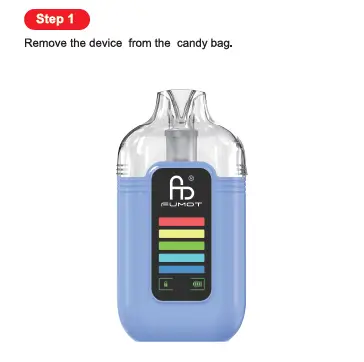
Step 1: Remove the device from the candy bag.

step-1-vibe-28000-pod-tutorial
Begin with unboxing your Vibe 28000 Pod:
  1. Locate the sealed candy bag packaging.
  2. Open the bag and remove the entire device assembly (main body + attached pod).
This step ensures your device is clean and ready for setup.

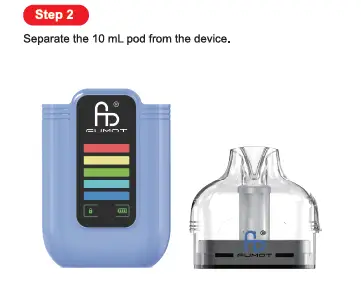
Step 2: Separate the 10 mL pod from the device.

step-2-vibe-28000-pod-tutorial
Prep the pod for refilling:
  1. Hold the main device body firmly.
  2. Pull the 10 mL pod (top component) straight upward to separate it from the base.
This exposes the pod for e-liquid filling and preparation.

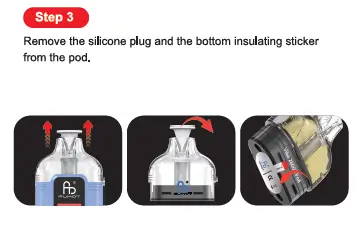
Step 3: Remove the silicone plug and the bottom insulating sticker from the pod.

step-3-vibe-28000-pod-tutorial
Clear the pod’s protective components:
  1. Pull the silicone plug from the top of the pod (covering the mouthpiece/fill port area).
  2. Peel off the insulating sticker from the bottom of the pod (the part that connects to the main device).
This step activates the pod’s coil and removes shipping safety measures.

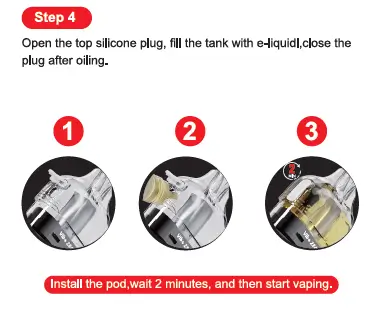
Step 4: Open the top silicone plug, fill the tank with e-liquid, close the plug after oiling.

step-4-vibe-28000-pod-tutorial
Refill the pod with your preferred e-liquid:
  1. Open the top silicone plug to expose the fill port.
  2. Carefully inject e-liquid into the 10 mL tank (do not overfill).
  3. Close the silicone plug firmly to seal the tank.
  4. Reinstall the pod back into the main device body.
  5. Critical Tip: Wait 2 full minutes before vaping to let the e-liquid soak into the coil (priming), preventing dry hits.

Key Vibe 28000 Pod Highlights

  • Refillable Open System: Use your favorite e-liquids with the 10 mL pod tank.
  • Replaceable Pods: Swap pods for new flavors or coils easily.
  • Digital Display: The device features a battery level indicator for quick checks.
  • Type-C Charging: Recharge the built-in battery via the base port to finish all e-liquid.
For full specs and replacement pod details, visit the official Fumot Vibe 28000 Pod product page.
How-to-Use-Leopard-40K-Refillable
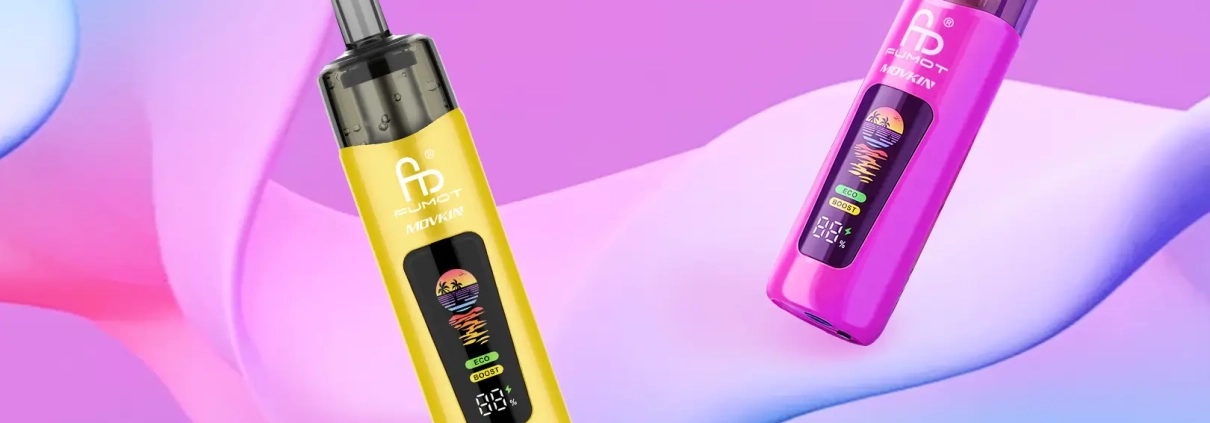
The Leopard 40K Refillable is a premium refillable pod system, built for long-lasting use, customizable flavor, and family-friendly safety. Follow the official 4-step process below to set up and start vaping seamlessly.

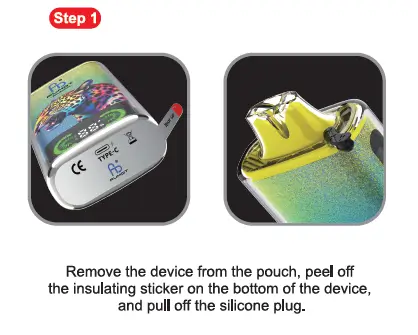
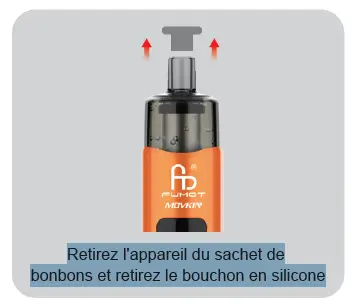
Step 1: Remove the device from the pouch, peel off the insulating sticker on the bottom of the device, and pull off the silicone plug.

Start with unboxing and initial prep:
  1. Take the Leopard 40K Refillable out of its protective pouch packaging.
  2. Locate the insulating sticker on the bottom of the device and peel it off completely to activate the battery.
  3. Pull off the silicone plug covering the mouthpiece to remove shipping protection.

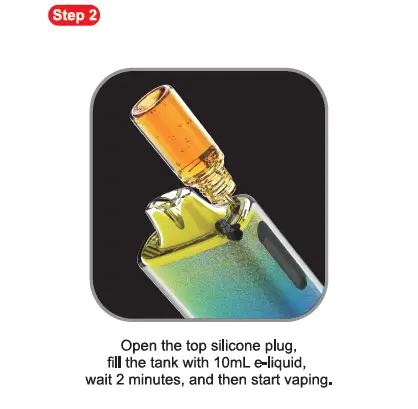
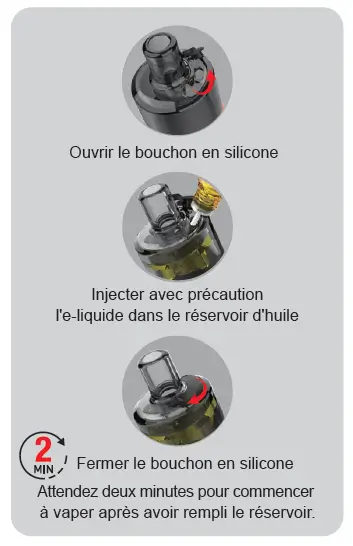
Step 2: Open the top silicone plug, fill the tank with 10mL e-liquid, wait 2 minutes, and then start vaping.

Refill the tank and prime the coil for optimal performance:
  1. Open the silicone plug on the top of the device to expose the filling hole.
  2. Carefully inject 10mL of your preferred e-liquid into the tank (do not overfill to prevent leaks).
  3. Close the top silicone plug firmly to seal the tank.
  4. Critical Tip: Wait 2 full minutes before vaping. This allows e-liquid to fully soak into the coil (priming), preventing dry hits and extending coil life.

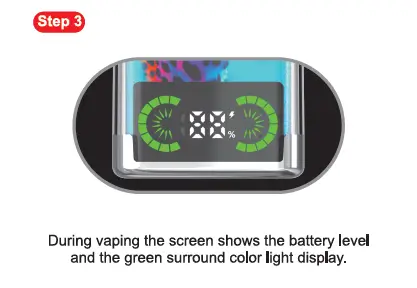
Step 3: During vaping the screen shows the battery level and the green surround color light display.

Monitor your device while in use:
  • When you take a draw, the device’s smart screen will display your real-time battery level, paired with a green surround color light to confirm active use.
  • This visual feedback lets you track battery status at a glance, so you never run out of power unexpectedly.

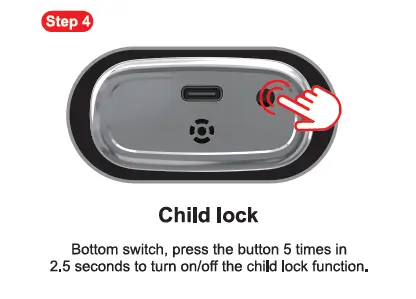
Step 4: Child lock

Secure the device with the built-in child safety feature:
  • Locate the switch/button on the bottom of the device.
  • Press the button 5 times within 2.5 seconds to turn the child lock function on or off.
  • This prevents accidental activation by children, keeping your device safe for household use.

Key Leopard 40K Refillable Highlights

  • Refillable Design: Reuse the device by refilling the 10mL tank with your favorite e-liquids.
  • Smart Display: Real-time battery tracking with green surround lighting for clear visibility.
  • Child Lock: Built-in safety feature to prevent unauthorized use.
  • Rechargeable: Type-C port (on the bottom) lets you recharge the battery to finish all e-liquid.
For full specs and replacement coil details, visit the official Fumot Leopard 40K Refillable product page.
how-to-use-altera-14k-x
The Altera 14K X is a high-performance refillable Direct-to-Lung (DTL) vape, the refillable version of the Altera 14K, designed for cloud chasers who want long-lasting use and customizable flavor. Follow the official 4-step process below (matching the product tutorial) to set up and start vaping.

Step 1: Remove the device from the candy bag, pull off the silicone plug.

Start with unboxing prep:
  1. Take the Altera 14K X out of its protective candy bag packaging.
  2. Locate the silicone plug on the mouthpiece (top of the device) and pull it off completely.
This removes the shipping protection and prepares the device for e-liquid filling.

Step 2: Open the top silicone plug, fill the e-liquid.

how-to-use-altera-14k-x-2
Refill the device with your preferred e-liquid:
  1. Locate the top silicone plug (covering the filling hole on the device’s top end).
  2. Open the silicone plug to expose the fill port.
  3. Carefully inject e-liquid into the tank (do not overfill to avoid leaks).
  4. Close the top silicone plug firmly to seal the tank.

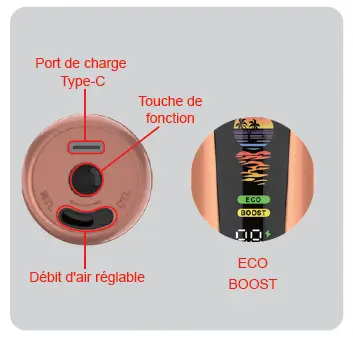
Step 3: Press the bottom round function key three times to turn on or off, slide bottom airflow control switch.

how-to-use-altera-14k-x-3
Activate the device and adjust airflow for DTL vaping:
  1. Find the round function key on the device’s bottom. Press it three times to power the device on or off.
  2. Locate the airflow control switch on the bottom, then slide it open to your preferred airflow level (wider for bigger clouds, tighter for more flavor).

Step 4: Press the bottom function key once to switch ECO/BOOST modes as preferred, place device upright & stand 5 mins before vape.

Final setup and priming:
  1. Press the bottom function key once to toggle between ECO Mode (smooth, long-lasting draws) and BOOST Mode (max power for dense DTL clouds).
  2. Place the device upright and let it rest for 5 full minutes—this allows e-liquid to fully soak into the coil (priming), preventing dry hits and ensuring optimal flavor.
  3. After 5 minutes, take a direct-to-lung draw to start vaping. (We recommend waiting 5 minutes, but you may also use it immediately.)

Key Altera 14K X Highlights

  • Refillable Design: Reuse the device by refilling the tank with your favorite e-liquids.
  • DTL Optimized: Built for direct-to-lung inhales, delivering thick, satisfying clouds.
  • Dual Modes: ECO for casual use, BOOST for cloud-chasing sessions.
  • Rechargeable: Type-C port (on the bottom) lets you recharge the battery to finish all e-liquid.
For full specs and flavor compatibility, check the official Fumot Altera 14K X details.
how-to-use-altera-14k
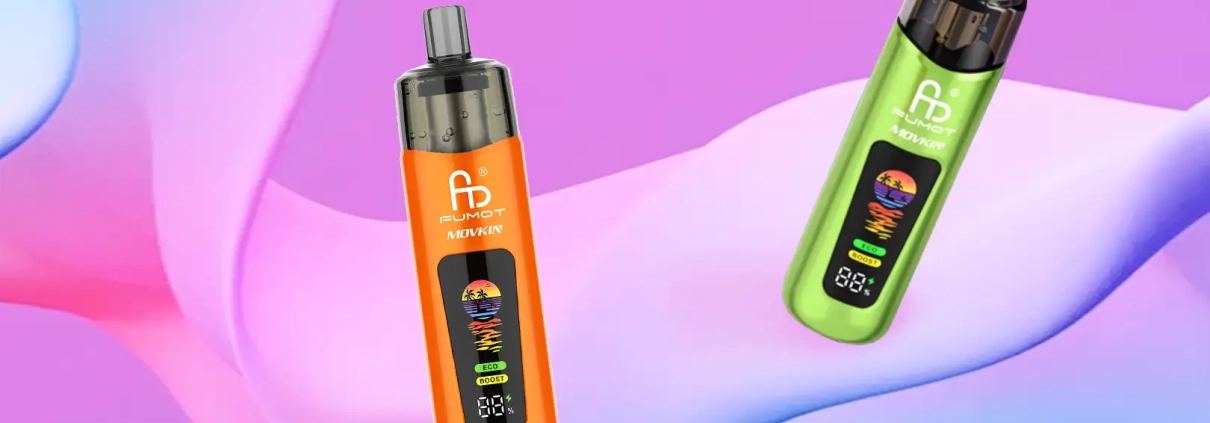
The Altera 14K is a high-performance Direct-to-Lung (DTL) disposable vape designed for cloud chasers and flavor enthusiasts alike. With up to 14,000 puffs, dual power modes, and customizable airflow, it delivers a seamless DTL experience—all in a ready-to-use disposable design. Follow the official 3-step process below to start vaping instantly.


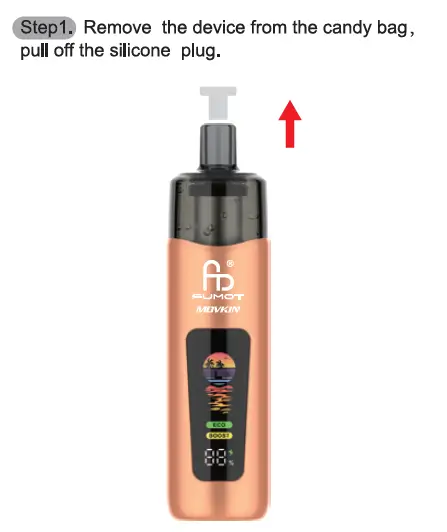
Step 1: Remove the device from the candy bag, pull off the silicone plug.

how-to-use-altera-14k-1
Begin with the simple unboxing prep:
  1. Take the Altera 14K out of its protective candy bag packaging.
  2. Locate the silicone plug on the top of the device and pull it off completely.
This removes the shipping protection, making the device ready for activation.


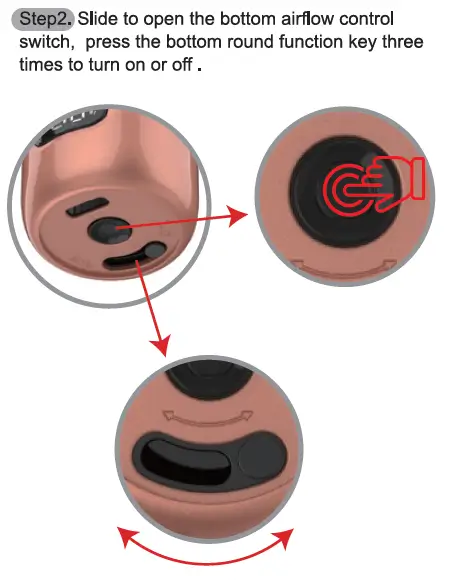
Step 2: Slide to open the bottom airflow control switch, press the bottom round function key three times to turn on or off.

Unlock the device and customize airflow for your DTL style:
  1. Find the airflow control switch on the device’s bottom and slide it open (adjust to your preferred airflow intensity for bigger clouds or concentrated flavor).
  2. Locate the round function key on the bottom, then press it three times to power the device on or off.
This step is critical for activating the device and setting up the airflow for smooth lung hits.


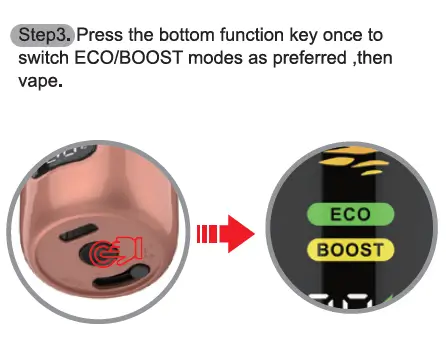
Step 3: Press the bottom function key once to switch ECO/BOOST modes as preferred, then vape.

how-to-use-altera-14k-3
Tailor your performance and start vaping:
  1. Press the bottom function key a single time to toggle between ECO Mode (for extended battery life and smooth draws) and BOOST Mode (for maximum power and dense DTL clouds). The device’s display clearly indicates the active mode.
  2. Take a direct-to-lung draw from the mouthpiece to enjoy your vape.


Key Altera 14K Highlights

  • DTL Design: Optimized for direct-to-lung inhales, delivering thick, satisfying clouds.
  • 14,000 Puffs: Long-lasting performance backed by a 17ml pre-filled tank and 1200mAh rechargeable battery (Type-C port included).
  • Dual Modes: ECO for casual use, BOOST for cloud-chasing sessions.
For full specs and flavor options, visit the official Fumot Altera 14K product page.

Please refer to the blog post for details on the differences between DTL Vape and MTL Vape.


About Fumot Tech

Shenzhen Fumot Technology Co., Ltd specializes in the production, research, and sales of disposable vape devices and customized electronic cigarette hardware. Over the past decade, Fumot has introduced several vape brands, including FumotSupbliss, and Vome, earning the admiration of a vast consumer base.

We pride ourselves on pioneering hardware designs and infusing the most delectable flavors into our devices. With our formidable research and development, manufacturing, and marketing capabilities, our products have reached major markets, including North America, Southeast Asia, the UK, Europe, and Russia. Our mission is to provide customers with the finest disposable vape devices!

Be sure to share your vaping story and tag us on social media with the tags #fumot_official, #fumotvape,  #supblissvape, or #vomevape.

Follow us on FacebookInstagramYouTube, and X.